

Exhibitor Brief
Thank you for your demo at DAX 2026! Please see important exhibitor information below, including FAQs, event floor plan, and table assignments.
FAQs
Registration & Check-In
Exhibitors will check-in at the Broadway Lobby. Please see the table location on the below floor plan. You will receive a special orange lanyard.
Setup and Breakdown Timing
Exhibitors should plan to setup their demos during breakfast from 8:00 AM - 9:00 AM on Tuesday, April 14. If your team cannot make this time, you can set up during the break (11:10 AM - 11:30 AM) or at the start of the Innovation Expo (12:15 PM). The Innovation Expo will run until 2:30 PM. Teams will have until 3:00 PM to load out.
What’s Provided and What to Bring
All exhibitors will have a standard 6-foot table, white linen, two chairs, one 24” display monitor, and a small sign indicating your table number and project name. All monitors will have an HDMI cable and a HDMI to USB-C Adapter. Each table will also have a dedicated power strip. Please bring your own laptop, any specialized dongles you may need, and any branding or signage to illustrate your project. If you plan to show both a poster and a demo, we will have an easel for you (see orange X’s on the below floor plan). We can provide a 30×40 or 20×30 foam board, but we will not print your poster. If you need to get your poster printed we suggest Columbia Print (printing@columbia.edu) which offers a good rate and a discount for current students (ask for the discount!).
Innovation Expo Lightning Round
Each exhibitor will give a brief, 1-minute lightning talk on stage to the full audience. Please be prepared to state your name, your project name, and share a few words about what your project is and what impact it can have. Teams will start to line up at 12:15 PM, and the talks will happen in no specific order from 12:40 PM - 1:10 PM. There will be two handheld microphones available which you will pass to the next team once you are done with your talk! The area to line up is indicated on the below floor plan.
Networking and Exhibitor Profile on the Whova App
We encourage all exhibitors to network with attendees and each other! The event will use the Whova mobile app (login here). Each exhibitor will be listed as an event speaker, and you should have already received login information to sign into the app and edit your profile. We encourage you to update your profile and take advantage of the in-app networking.
Demo Floor Plan
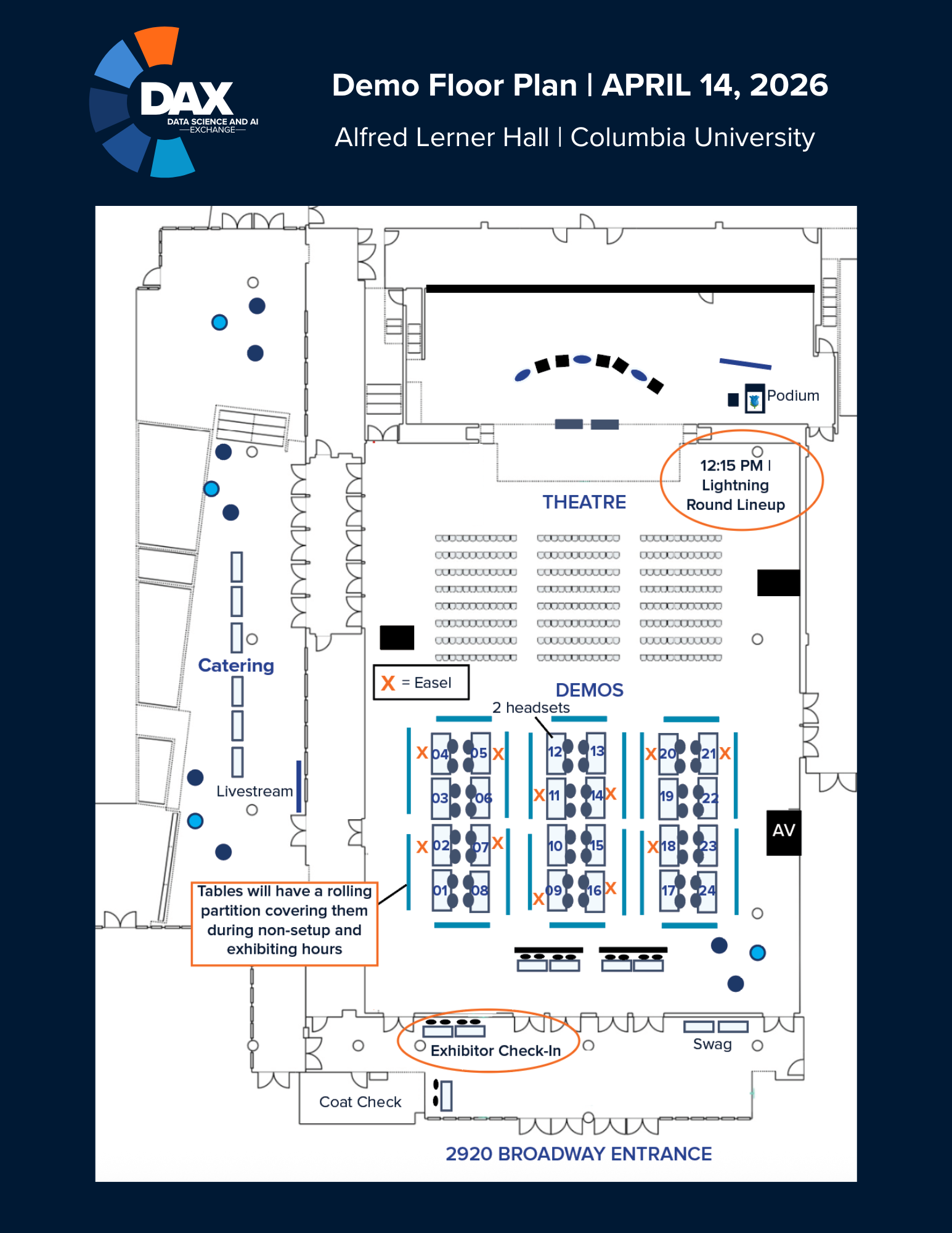
Table Assignments
D01: Tactorum Inc
D02: Fair Aggregation in Virtual Power Plants
D03: AI-Driven Clinical Decision Support for Diabetes Treatment Selection
D04: Mirror AI
D05: AskAI Projects (Explainable Asset Allocation and Portfolio Construction; and AI Deployment Framework for Consumer Credit Models)
D06: RateMate Energy
D07: Checkpoint-lite
D08: Metlas
D09: Data Flow Control
D10: LakeAgent: Search and Reasoning over Large Heterogeneous Data Lakes
D11: A Census-Tract Analysis of Data Center Climate Vulnerability in the United States
D12: Curiously AI
D13: Sky Valley
D14: Reliable Vibe Coding
D15: Doppel Market
D16: Inside Outside Health
D17: nMonica
D18: Generalizing Risk Parity via Optimal Risk Budgeting with Target Returns: Exact and Tight Approximation Algorithms
D19: Arklex.AI
D20: Quantifying Video Storyline: A Theory-Guided Multimodal LLM Approach For Creative Insights
D21: Linking Data Centers, Energy and Weather Risks via AI
D22: AI and the Tapestry of Ethnic Placemaking in American Suburbs
D23: Delegated Control Under Attack: A Measurement-Driven Threat Model for Exposed AI Agents
D24: Socrat